
Tea Spins App (PWA) for Mobile Devices in the UK
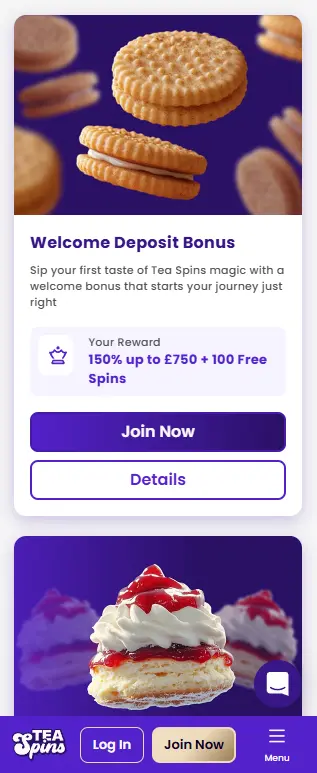
The Tea Spins app isn’t available as a download from the App Store or Google Play. Tea Spins Online Casino instead provides a Progressive Web App (PWA), which allows players to register a new account or return to an existing session exactly where they stopped. The shortcut is light, takes seconds to place on a home screen, and feels as convenient as a native program. Through it, mobile users can browse thousands of titles and claim the same perks as on desktop, including the welcome bonus and The Spinning Scones Club.

Clean design and everything loads quickly. I use it during my commute and it never lags. Really enjoyable way to pass the time.
Lovely visuals and easy to pick up. Would like a few more game options, but the updates have been steady. Looking forward to what comes next
simple to navigate and the sound effects are a nice touch. Support got back to me within a day when I had a question. pleased overal
Why Tea Spins Has No APK
Tea Spins Casino does not distribute an APK file, and the Tea Spins application can’t be found in the Google Play Store either. Rather than a downloadable package, the platform works as a PWA: players open it in a mobile browser and pin it to the home screen, so there’s no separate file to install.
Anyone who spots a “Tea Spins APK” on a third-party site should avoid downloading it. It isn’t an official release, and APK files from unofficial sources are a popular way for scammers to spread malware disguised as casino software, sometimes built to steal login or payment details. Adding the Tea Spins PWA through the browser is the only official route to app-like access, and it carries none of the risks of sideloading.
PWA vs Native App: What’s the Difference?
The choice of a Progressive Web App over a native build is deliberate rather than a limitation. A PWA runs in the mobile browser and refreshes itself each time it’s opened, so there’s no store listing to hunt for, no manual updates, and no installer file that scammers could fake or tamper with. It also behaves the same across practically any modern phone, instead of being tied to specific Tea Spins Android or Tea Spins iOS versions.
| Feature | Tea Spins PWA | Typical Native App |
|---|---|---|
| Installation | Add to home screen via browser | Download from App Store / Google Play |
| Updates | Automatic, happens instantly | Manual, requires user to update |
| Storage space used | Minimal, no separate install | Fixed storage footprint on your device |
| App store approval needed | No | Yes |
| Works across devices | Any device with a modern browser | OS-specific (separate Android / iOS builds) |
| Risk of fake/malicious versions | Low, accessed only via official site | Higher, fake APKs can be sideloaded |
| Offline play | Not supported | Sometimes supported |
Signs of a Fake Tea Spins App
Since the only official access is the PWA, anything presented as a Tea Spins app from another source deserves suspicion. The main warning signs are:
- Offered as an APK file. The casino has no APK, so any site offering one is unofficial, however convincing it looks.
- Listed in the Google Play Store or App Store. Tea Spins isn’t published in either store, and a listing using the name doesn’t prove a genuine connection to the brand.
- Asks for unusual permissions. Requests for contacts, SMS messages, or device admin rights are a typical red flag in fake gambling apps. The real PWA never asks for them because it simply runs in the browser.
- Pushed through unsolicited links. Ads, pop-ups, or messages urging users to “download the official Tea Spins app now” from an unfamiliar link are a standard phishing tactic.
- The URL doesn’t match the official domain. Players should confirm they add the PWA from the casino’s real website, not from a lookalike domain with similar spelling.
When in doubt, the safest move is to open the official site directly and set up the PWA from there instead of following a link from an ad, email, or download page.
How to Download the Tea Spins App on Android and iOS
UK players can get the Tea Spins PWA on any smartphone for free. The process takes three steps on the device of choice:
- Open the official home page of the casino.
- Tap the browser menu button and look for the Tea Spins Casino app option.
- Select “Add to Home Screen”.
A shortcut then appears on the home screen. Tapping its icon at any time opens a gaming session or the account area.
Supported Devices
The mobile software works regardless of device type. As long as a phone meets the basic requirements, the mobile version installs and runs without trouble. The main supported devices in the UK are:
- iPhones.
- iPads.
- Android phones.
- Android tablets.
Because it’s a progressive web app, it offers wide compatibility. The Tea Spins mobile app runs smoothly on almost any device, which makes it one of the most accessible gambling tools around.
Tea Spins Mobile App Requirements
As the PWA isn’t a downloaded program, there’s no fixed storage or RAM requirement. Players are only adding a home-screen shortcut. What they do need is:
- A reasonably current browser: Chrome 90+, Safari 14+, or Samsung Internet 14+
- An active internet connection (3G/4G/5G or Wi-Fi), since games aren’t stored locally for offline play
- A smartphone or tablet running Android 8.0+ or iOS 13+ for the smoothest experience
Exact browser and OS requirements can differ slightly between devices, but any phone able to run a modern browser can run Tea Spins.
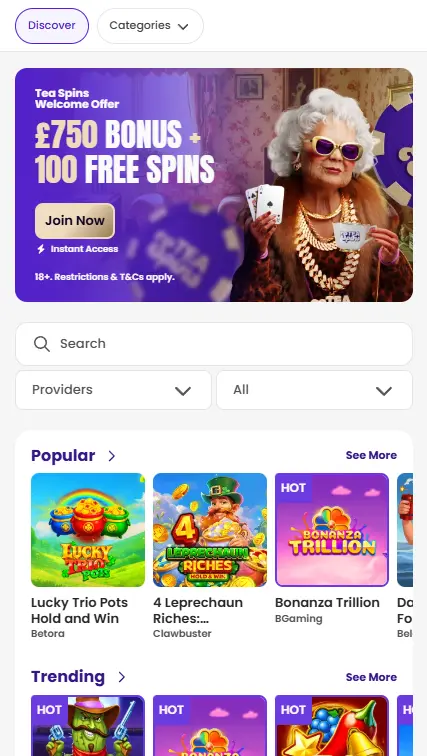
Mobile Interface
The Tea Spins application uses a clean white and purple design that mirrors the official website. It’s built to make the most of a smartphone’s display, so visuals look sharper and crisper.
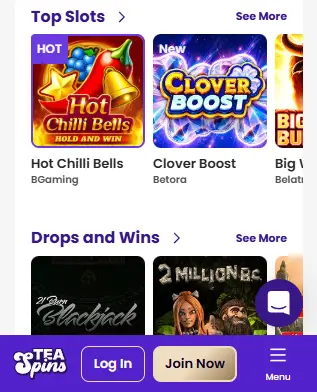
On first launch, a short pop-up lets users either create a player profile or sign in to an existing account. UK players are then taken to a front page with quick access to the most popular games. New releases and the titles with the biggest payouts are also listed there, and the selection can be filtered by factors such as software provider and game features.
The menu button in the lower-left corner opens the latest promotions. The sidebar menu also gives access to mega payout tournaments and account management.
How to Play Games
Finding the next big jackpot in the app is straightforward:
- Pick any game from the “Popular”, “Recommended” or “Top Releases” sections.
- Or tap the “Provider” field and choose a developer to see all of their games on the platform.
- Or use the search bar and type the name of a specific title.
- Once something looks appealing, tap it to open.
The Tea Spins mobile app lets UK users launch games in demo or real-money mode, so they can chase big wins or just play casually.
Tea Spins Casino App Features
The Tea Spins Casino app gives UK users multi-factor authentication for stronger security, plus faster reload speeds in live casino games. Data usage has also been optimised, so long sessions don’t drain much mobile data.
Beyond thousands of games and over a dozen active promotions, banking is smooth. More than 7 payment solutions are available for funding a bankroll and cashing out winnings, and customer support is easy to reach from the app.
Mobile Security Features
The casino follows strict data protection policies and collects only the information needed to manage an account. Two-factor authentication (2FA) is supported, giving players an extra layer of protection for their account and activity.
The software also undergoes regular, thorough security audits, which help detect and close any loopholes. It connects to some of the most secure payment solutions in the UK, so bankroll management stays confidential.
Top Mobile App Bonuses
Mobile players can claim offers such as Freshly Baked Spins. To get it, they log in and stake at least 30 GBP on any title in the “New Releases” section.
The stake must be placed between 00:00 and 23:59 (UTC) on Tuesdays. Once the requirement is met, 10 free spins are credited immediately. The reward carries a 40x wagering requirement.
Another popular promotion is Teatime Top-Up, which gives UK players 50% of their first deposit on Fridays. The maximum bonus is 100 GBP. To claim it, players enter the code “TOPUP” when depositing at least 30 GBP.
Granny’s Gambit and Granny’s Get Back are two further promotions that can be used conveniently through the mobile platform.
Pros and Cons of TeaSpins App
These are the main advantages and possible drawbacks for UK users:
| Pros | Cons |
|---|---|
| Access to 4,000+ games | Can’t be used with VPNs |
| Easy-to-use interface | Doesn’t support offline use yet |
| Massive promotions on Tea Spins Casino mobile | Can’t be used in many countries |
| Reliable customer support | |
| Multiple fast and secure payment methods | |
| Highly rewarding loyalty program | |
| Top-tier security features |
Overall, the Tea Spins app offers the right set of features to make mobile gaming sessions worthwhile.
Our Rating of the Tea Spins App
The Tea Spins app (PWA) scores 7.0 out of 10 in our review, under the “Mobile experience” criterion of How We Rate. The overall rating of Tea Spins Casino is 7.6 out of 10; see the full review for the breakdown.
| What We Looked at | Result |
|---|---|
| App type | Progressive Web App, no native iOS or Android app and no APK |
| Installation | Three steps via “Add to Home Screen”, no store download |
| Supported devices | iPhones, iPads, Android phones and tablets |
| Security | Optional 2FA, regular security audits, basic data collection |
| Features | Full game library, demo and real-money modes, mobile promotions |
| Limitations | No offline play, internet connection required |
FAQ
Is the Tea Spins PWA the same thing as a native app?
Not exactly, although it behaves like one. Players can put it on the home screen and open it with a single tap. Technically, though, it is a website that runs inside the mobile browser and not a separate program installed on the device. According to the review, the experience is almost identical to a native app, and there is no downloaded file that could carry security risks.
Why is there no Tea Spins app in the App Store or Google Play?
The casino uses a PWA instead of store apps. This lets Tea Spins push updates to all players at once and work on almost any smartphone. It also avoids app store approval and the need to maintain separate Android and iOS versions.
Does the Tea Spins PWA use much storage on a phone?
No, only a little. The device keeps the home screen shortcut and some cached data. This is far less than a downloaded app would need, because the games run through the browser and are not installed on the phone.
Is it possible to use the Tea Spins PWA offline?
No. Nothing is stored locally on the device, so an active internet connection is required. In this respect it works the same way as the desktop site.
Is a Tea Spins app on Google Play genuine?
No. Tea Spins does not publish an app on Google Play or in the App Store. Any listing that uses the name has no official connection to the casino, and installing it could put the device and personal data at risk.
Does the PWA need to be reinstalled after a browser or phone update?
No. The PWA is not a separately installed program, so browser and operating system updates do not remove it and players do not have to set it up again.
Can players move between the PWA and the desktop site without losing their session?
Yes. Both use the same account, so a player can switch between phone and desktop in the middle of a session. Progress is kept, and there is no need to log in again.